
KI - Krypto Arbitrage Handel
Language Settings Description
In Alfaview, you can easily configure the translation of a foreign language. For example, if the moderator is speaking in English, you can select that language setting. The translation is provided either via text or through an interpreter.

Setting in your meeting room:
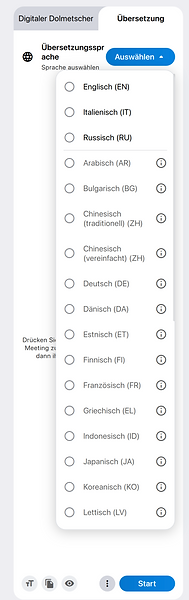
Click on the "Transcription" icon in the top bar to open the selection panel on the left.
Now, click on "Translation" within this panel to display all available languages.
In "Images 1 and 2" on the right, you can see the languages available for selection. Three languages have been selected, which are displayed
in "Image 3" at the very top right.
Here is an example:
The presenter is speaking German.
However, you do not speak German—perhaps you are Italian, French, or English, or your native language is something else entirely. In this case, simply click on your native language.
If your native language is not displayed, click on the small circle with three dots at the bottom to reveal the remaining languages.
Finally, click "Start" to begin the translation.


Your
Spoken
Language
Select
Language

Questions from international participants
If one of the other international participants asks a question in the meeting, the question will be translated into your language or displayed as text. If the moderator answers the question in German,
you will again receive the translation in your language. Therefore, you won't miss anything.